A logo identifies your business, but it cannot do every job on its own. You also need a way to apply it to the places where people learn about your services, contact you, and work with you.
That does not mean buying a large collection of graphics before you can get started. In my brand identity and Squarespace work, I want the assets to match the actual business. A useful service page may matter more than a set of highlight covers you will never use.
This guide explains the main categories of brand assets beyond a logo, what each one helps you do, and how to choose what belongs in your next project.
Start With a Real Use, Not a Shopping List
List the places where someone currently encounters your business. Include the website, an inquiry reply, a referral introduction, or an in-person event if those are part of your work. Then identify the information and visuals needed in each place.
Keep existing branding that remains usable. If your logo and colors still fit, you may need clearer guidance or a few practical applications rather than a new identity. My visual identity guide explains how the pieces relate.
A coordinated presentation can make the business easier to recognize. It does not establish service quality or guarantee trust, engagement, or sales. Accurate information and a working next step still matter.
1. A Brand Style Guide You Can Apply
A style guide records approved visual choices and shows how to use them. Its value is in answering the questions you or a collaborator actually face, rather than reaching a particular page count.
Logo arrangements: which approved version to use, minimum-size guidance, clear space, and suitable backgrounds.
Colors: the intended combinations and relevant specifications for screen or print production.
Typography: font names, roles, and information about access and licences.
Examples: a few layouts showing the choices working together, with common mistakes to avoid.
Photography, icons, and verbal guidance can be included when they are part of the agreed scope. Ask what your project includes rather than assuming every package contains the same document. The Age In Place Care Solutions example below shows one way to present visual guidance.
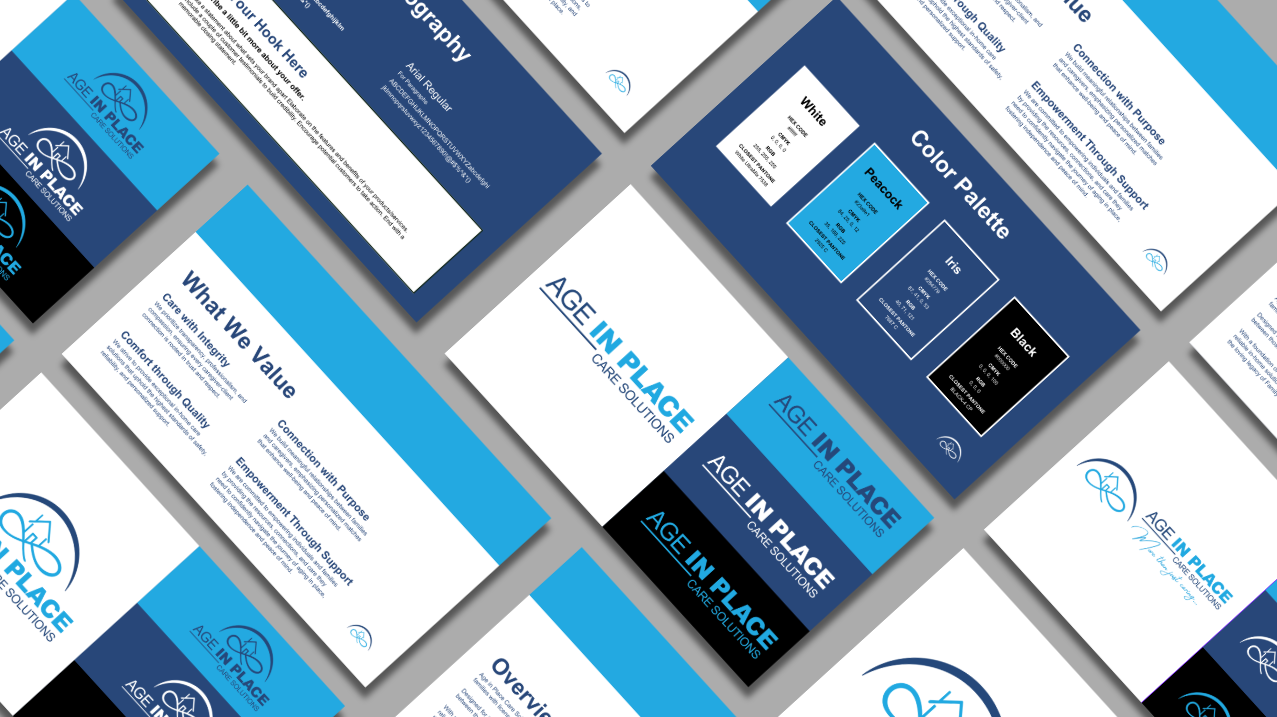
Brand Style Guide Example for Age In Place Care Solutions.
2. Social Profile Assets and Reusable Post Layouts
If you actively use a social platform, prepare the pieces that make the profile usable there. That might mean an approved mark that remains readable in a small profile circle, an appropriate banner, and a description that matches your current service.
A reusable post layout is useful when you repeat a type of content, such as answering a client question or announcing a workshop. It should leave room for the actual message instead of forcing every idea into the same crowded graphic.
Check the actual profile crop and text size on a phone.
Keep important information in the post text as well as any graphic where appropriate.
Use a destination link that delivers what the profile or post promises.
Make only the formats you plan to maintain.
The Freeman Sound & MINDSET Concert Series example below illustrates related social layouts. It is a design example, not evidence of an engagement increase. A social kit provides visual starting points; ongoing writing, publishing, and responding are separate work.

Social media templates with cohesive branding for Freeman Sound & MINDSET Concert Series
3. Marketing Materials for Actual Conversations
Choose collateral around a real situation: someone asks about your services, attends a presentation, or needs information to share with a colleague. A business card, service sheet, slide deck, or branded PDF can help when it has a clear role.
For each item, decide what the reader should understand and where they should go next. Check names, service details, contact information, and links before approving the design.
Print work also needs the production requirements of the intended supplier. Ask about dimensions, file specifications, proofing, and who approves the final output. Do not order a large quantity simply because a mockup looks appealing.
The EmpowerMINT Wellness stationery example below shows the identity applied to a folder, cards, and an envelope. Those applications are options to evaluate, rather than a requirement for every online service business.

Professional marketing collateral design sample for EmpowerMINT Wellness.
4. Website Images and Visual Guidance
For a service website, I would start with the pages and questions the visitor needs. The visual assets should support that content: a suitable logo file, relevant photographs, readable color combinations, and a clear hierarchy for headings and actions.
You do not automatically need custom illustrations or an icon beside every paragraph. A Squarespace starting layout can work with existing usable branding. The decisions about content, spacing, imagery, and the inquiry path still need attention.
Choose photos that relate to the service and have appropriate permission for the intended use.
Check crops on a phone and a larger screen, including text placed over an image.
Write useful alternative text for images that convey information.
Give buttons accurate labels and test where they lead.
The Harbor Home Design example below shows a coordinated website presentation. It illustrates an application of an identity; it does not demonstrate a change in inquiries or sales. My Squarespace website design page explains how I approach website projects.

Branded website hero section example for Harbor Home Design.
5. Email Layouts That Support the Message
If email is part of your communication, a reusable layout can give recurring messages a recognizable structure. A newsletter, appointment reminder, and inquiry reply have different jobs, so they do not all need the same design.
Start with readable text, a clear sender identity, and the information the recipient needs. Add a logo, image, or button when it helps. A simple message can be appropriate; every email does not need a large promotional header.
Test the layout in the email system you will use and on relevant devices. Check links, image loading, and how much the message still communicates when images are unavailable. Confirm who will build, test, and maintain the template before commissioning it.
The Luminous Electric example below was designed by me at Rooks Advertising, as credited in the original caption. It is retained as a design example. It does not imply that email platform setup, campaigns, or ongoing sending are included in a Constant Creates brand or website project.

Email marketing template for Luminous Electric, designed by me at Rooks Advertising.
6. Documents, Signage, and Other Situational Assets
Some assets become useful because of how the business operates. A proposal layout can help present an agreed scope clearly. An onboarding document can organize preparation instructions. A sign can help someone find the right table or location.
Merchandise, uniforms, event displays, presentation slides, and short link pages belong in this category. Consider them when there is a specific use, a responsible owner, and room in the budget.
A link page, for example, might offer a short route to current services and contact information. It needs maintained destinations and clear labels, not a long list of every link the business has ever shared.
For proposals or contracts, visual design does not replace checking the underlying terms. For physical items, confirm production suitability before ordering. Include any design, supplier coordination, training, or implementation you need explicitly in the written project scope.
The Northstar Electric uniform and merchandise mockup below illustrates identity applications on garments and hard hats. It does not establish production specifications or promise a particular product is available to order.

Uniform and merchandise design for Northstar Electric.
Choose What to Create Now, Reuse, or Defer
For each possible asset, write down its use, the current problem, who will maintain it, and what would count as a usable delivery. Put work with an immediate role ahead of attractive extras without a planned use.
A Fictional Example: An Independent Garden Designer
Imagine a garden designer who receives referrals and sends prospective clients to a website. The existing logo still fits, but the service description is outdated and each inquiry reply uses a different attachment. This is an illustrative example, not a client result.
Reuse: the approved logo, suitable project photography, and colors that still work.
Create now: a short visual reference, updated service-page imagery, and one accurate service PDF for inquiries.
Defer: an extensive social kit, merchandise, and event signage until there is an actual use.
Check before handoff: the PDF is readable, the links work, the imagery is approved, and the designer knows which files can be edited.
The priority changes if the business mainly meets people at events or publishes workshops. The useful question is which assets support the next real interaction, not whether you have collected every category.
Brand Asset Questions, Answered
What Is a Visual Brand Identity?
It is the connected set of visual choices used to represent a business, such as logos, colors, typography, and imagery. Brand assets are the files, guidance, and applications that put those choices to work.
Do I Need More Than a Logo?
You need what allows you to use the identity in your actual business. That might begin with an approved logo export, basic guidance, and a useful website. It does not make every social or print asset essential.
What Belongs in a Style Guide?
Include the agreed visual rules and examples needed to apply them. Confirm logo use, colors, typography, and relevant image guidance. The exact contents should be specified in your project scope.
Is Social Branding the Same as Content Creation?
No. Profile assets and reusable layouts provide visual structure. Researching topics, writing posts, publishing, and handling responses are ongoing activities that need their own plan and responsibilities.
What Should I Prioritize When Starting Out?
Start with the place people use to understand and inquire about your service. Keep usable existing branding, correct the important information, and prepare the assets needed for that path before commissioning extras.
How Often Should I Update My Assets?
Review them when the service, audience, identity, platform, or practical requirements change. Fix incorrect details promptly. There is no universal requirement to replace an identity after a set number of years.
Does an Online Business Need Printed Collateral?
Only when it serves a real purpose. A printed card or service sheet may help with referrals or events. A digital document may be enough for another business. Choose around how people actually contact you.
When Is an Email Template Useful?
When you send a recurring kind of message and need a reusable structure. Begin with the information and action required. A text-led layout may suit the job better than a heavily illustrated email.
Which Email Platform Should a Designer Build For?
Confirm compatibility with the actual system you use before agreeing the scope. Ask who will implement and test the design. A visual mockup does not automatically include a working template or platform support.
How Does a Template Differ From a Custom Graphic?
A template provides a structure you can update for repeated uses. A custom graphic may address one particular item or campaign. Confirm editable files, permitted uses, and who will make future changes.
Does a Website Starting Layout Require Custom Graphics?
Not automatically. Use graphics when they help explain the service or guide a visitor. Existing branding and relevant approved photography may be sufficient. Check the actual content and layout before adding decoration.
What Should I Confirm for Merchandise or Event Signage?
Confirm the design scope, intended product, supplier requirements, production proof, and approval responsibility. Ask whether coordination and production are included; a mockup alone does not answer those questions.
What Is a Digital Business Card or Link Hub?
It is a short page that directs people to selected current destinations. It can be useful for a profile or networking introduction, provided the links and service information are maintained.
Should My Team Receive Asset Training?
If other people will apply the identity, agree what instructions or walkthrough they need and whether those are included. Specify the format and boundaries of support instead of assuming unlimited help after delivery.
How Can I Get Help Choosing the Assets?
Bring your current materials, actual communication needs, and budget to a scope discussion. My brand identity services are a starting point for understanding the design work; the personal audit below is an option when you want a written roadmap first.
Check the Files and Guidance Before You Use Them
Once you have chosen a scope, my free Brand Handoff Checklist helps you review the files, visual guidance, licences, and access you have agreed to receive. Use it to create a handoff record and identify questions for your designer.
You can use, edit, download, and print the record without email. Add your name and email if you want a copy sent to you. Fridays with Faye is selected on the email form and can be unchecked.
Use your written scope as the reference. Something not included is a scope question, rather than an automatic failed check. The tool does not inspect your website, verify licences, or decide which assets your business must buy.
Open the Brand Handoff Checklist in its own tab if you prefer to use it directly.
When You Want a Personal Roadmap
My $350 Personal Brand & Website Audit includes a written roadmap and a 60-minute review. Implementation is quoted separately. A separate $250 credit applies toward a project booked within 30 days.
See what the personal audit includes. You can also begin by reviewing one real client path and choosing the smallest useful set of assets to support it.